
-
Product Catalog
- Security and Surveillance Systems | accessories
- Lighting solutions for industrial | commercial | residential | outdoor environments | accessories
- Automation and Control Systems
-
Smart Automated Products | Control | Transmission | Detection
- Smart Emergency Call System SOS
-
Smart Office Management Solutions
-
Office security and access control | management systems
- Electromagnetic door locks | latches for ensuring access control and security of premises | Accessories
- Electromagnetic door holders for various types of doors | ensuring convenience and safety in premises
- Hydraulic door closers | with impact damping | for smooth and silent door closing
- Exit door opening buttons | for controlling various types of indoor doors
- Face scanning and recognition systems | for secure and efficient access control
- Biometric fingerprint scanners | designed for security and access management
- Card | QR Code | Electronic Key Readers | For Premises Security and Access Control
- Electronic entry cards | key fobs | keys | stickers | for secure and convenient access management
- Door Code Locks | For Security and Access Management of Premises
- Turnstiles | Efficient People Flow Management | Access Control
- Intercoms
- Gate control access management systems
- Access control systems for electronic locks
- Door control and interface controller connection solutions
- Electronic door locks and access controllers
- Canopies for intercoms | protection of access control equipment
- Smart Door Locks | Security and Access Control Solutions
- Universal mobile | network routers
-
Office security and access control | management systems
- Mirror lighting – modern | smart | functional lighting and control solutions
- Automatic vacuum cleaner robots | smart solutions for daily home care
- NOUS smart | automated control
- WOOX Smart | Automated Control
- SONOFF Smart | Automated Control
- iNELS RF smart | automated control
- TUYA Smart | Automated Control
- IMOU smart | automated control
- Smart home hubs | accessories | for home automation
- Smart water valve controllers | water supply management
- Smart electrical sockets | energy management
- Wireless automation modules | for smart system control
- Smart Automated Gate Control
- Farm automation | livestock equipment
- Electrical distribution and installation
- Solar Energy Generation and Management Equipment
- HVAC control solutions for heating and ventilation
- Accessories for cars
- Workplace Safety | Electrical Safety Equipment | LOTO
- Technical maintenance | service equipment | fire protection solutions
- Emergency safety | hygiene | sanitary solutions
- Other products
- Quality used products
-
Manufacturer



































Exit door opening buttons | for controlling various types of indoor doors
- Read more
Door exit buttons: first decide where and how you will connect it, then which button
One button, but two wiring schemes – this determines whether the lock will release without an access controller.
In this category you will find 11 buttons for indoor doors – mechanical, with LED, capacitive touch and contactless IR – and 3 outdoor buttons rated IP65. Each one shows whether it has NO/NC/COM contacts and whether it needs power. Below: a selector, solution levels and a detailed guide with wiring diagrams.

 The most common mistake is choosing a button by its looks rather than by its contacts. A button with only an NO contact will not release a magnetic lock without an access controller. Answer 3 questions and we will pick the right one.30-SECOND SELECTORWhich exit button is right for your door?3 questions · products with prices · recommended by ELSprendimai
1. Where will the button be installed?
2. What kind of button?
3. How will you connect it?
Level 1 · basic
Mechanical button, no power requiredThe cheapest and most reliable: no electronics, compatible with most access controllers. The square model has NO/NC/COM, so it can also be wired directly to the lock.
Square 86×86, from 5.24 € →Level 2 · narrow frame
Buttons for door frames and aluminium profilesFor glass partitions and profile doors where there is no wall space: a plate 28–32 mm wide.
Stainless steel, from 7.20 € →
With LED and NO/NC/COM →
Aluminium, concealed screws →Level 3 · visibility and design
LED-illuminated and ultra-slimFor dark corridors and prestige interiors: an illuminated button or an 8.5 mm thin EXIT key.
86×86 with LED →
Slim 8.5 mm with LED →Level 4 · hygiene
Capacitive touch and contactless IRFor healthcare, food industry and laboratories: no mechanical button, NO/NC/COM relay output and LED status. Power required: 12 V for touch models, 12/24 V DC for IR.
Touch 86×86 →
Contactless IR, flush-mounted →Level 5 · outdoors
IP65 outdoor buttonsFor gates, wicket gates and exterior doors: a sealed metal mechanical button or a touch button with relay output.
Metal IP65/IP67 →
With green/red LED →
Touch IP65, NO/NC/COM →Related ELSprendimai guides: Electromagnetic door locks · Access control systems · Door code locks · Door intercoms · Smart door locks
- Sorry, the product you are looking for was not found. Please review other offers from the same category.Read more
Door exit button guide: contacts, wiring diagrams, indoor and outdoor solutions
An exit (REX – Request to Exit) button lets you open an electrically locked door from the inside without a card or code. Selection takes three steps: 1) where the button goes – indoors or outdoors, 2) how it will be connected – to an access controller or directly to the lock, 3) which type – mechanical, with LED, capacitive touch or contactless. Specific parameters are given in each product description.
Colour key: ■ information · ■ benefit, solution · ■ ⚠ check this · ■ ⚡ safety, mistakes
Contents: What do you need? · NO, NC, COM · Wiring diagrams · Button types · Matrix of all buttons · Emergency exit doors · What to check · Mistakes · FAQWhat do you need? Quick selection
Where Situation Solution Where to find it Indoors Office door with card reader and access controller Mechanical button, NO–COM to the access controller REX input Square 86×86 · 5.24 € Indoors Magnetic lock without access controller, powered through the button Button with NO/NC/COM, NC–COM in series with the lock power supply 86×86 NO/NC/COM · Narrow with LED Indoors Glass partition, aluminium profile doors Narrow 28–32 mm button on the profile Stainless steel · Aluminium with LED Indoors Dark corridor, stairwell with motion sensor LED-illuminated button 86×86 with LED · Slim 8.5 mm Indoors Clinic, laboratory, food production Contactless IR or capacitive touch sensor with relay output IR flush-mounted · Touch 86×86 Outdoors Gates, wicket gates, exterior doors IP65 button: mechanical or capacitive touch Metal IP65/IP67 · Touch IP65 NO, NC and COM: what they mean and why they matter most
KibirkštisWhy does one button release the lock directly, while another only works through an access controller?
FazėThe contacts are different. NO closes when pressed – that is a signal to the access controller. NC opens when pressed – it can simply cut the lock power. A button with NO/NC/COM works in both cases.Marking Meaning When it is used NO Normally open – closes when pressed Signal to an access controller, door intercom or code lock REX input NC Normally closed – opens when pressed In series with the fail-safe magnetic lock power supply – pressing cuts the power and the lock releases COM Common contact The common point against which NO and NC are switched ⚠ Important: the product name states “contacts 3A/36VDC” is the contact switching rating, not the supply voltage. Mechanical buttons need no power; touch and IR buttons require 12 V or 12/24 V DC – this is stated separately.Two wiring schemes
Scheme A · with access controller (recommended)Button
NO–COM→Access controller
REX input→Lock
released for a set timeThe access controller releases the lock for a set time, logs the exit event and can be linked to the fire alarm system. Any button will work.
Scheme B · without access controllerPower supply
+12/24 V→Button
NC–COM→Magnetic lock
fail-safeWhen pressed, the NC contact cuts the lock power – the door stays unlocked while the button is held. Requires a button with NO/NC/COM; a timer relay is used for a release delay.
Inductive load: a magnetic lock is a coil. If the lock has no built-in protection diode or varistor, connect one in parallel with the lock – otherwise the switch-off voltage spike will burn the button and relay contacts.Button types: how they differ in practice
Type When to choose Power Example Mechanical Offices, warehouses, stairwells – when price and simplicity matter Not required 86×86 · narrow Mechanical with LED Dark areas, hotels, prestige interiors LED only – low voltage 86×86 with LED · slim 8.5 mm Capacitive touch sensor Easy-to-clean surface, no mechanical wear – a touch is required 12 V DC 86×86 · 86×50 Contactless IR Healthcare, food industry – opens when a hand approaches 12 / 24 V DC 115×40 · 115×70 Outdoor IP65 Gates, wicket gates, exterior doors Depends on type mechanical · touch
KibirkštisThe slim EXIT button looks great, but can it be installed outdoors?
FazėIts IP rating is not specified, so outdoors only with a protective rain cover and a sealed cable entry. For direct rain exposure, choose an IP65 model.Matrix of all buttons
Click a row to highlight it so you can compare several options.
Button Type Contacts Power Dimensions · mounting Price Square stainless steel button 86×86, without LED Mechanical NO/NC/COM no power required 86×86 mm · wall 5.24 € Narrow stainless steel button for door frames Mechanical NO/COM no power required 86×28 mm · door frame, profile 7.20 € Narrow stainless steel button with LED for door frames Mechanical with LED NO/NC/COM LED – low voltage 91×28 mm · door frame, profile 8.48 € Narrow plastic button for door frames Mechanical NO/COM no power required 83×32 mm · frame 11.05 € Aluminium button with blue LED, concealed screws Mechanical with LED NO/COM LED – low voltage 83×32 mm · frame 12.82 € Touch EXIT panel 86×86 Capacitive touch sensor NO/NC/COM 12 V DC 86×86 mm · wall 13.75 € Touch EXIT panel 86×50 Capacitive touch sensor NO/NC/COM 12 V DC 86×50 mm · wall 13.75 € Contactless IR EXIT button, flush-mounted 115×40 Contactless IR NO/NC/COM 12 / 24 V DC 115×40 mm · flush-mounted 13.99 € Square stainless steel button 86×86 with LED Mechanical with LED NO/NC/COM LED – low voltage 86×86 mm · wall 14.29 € Ultra-slim 8.5 mm EXIT button with LED Mechanical with LED NO/COM LED – low voltage 60×30×8.5 mm · wall 14.54 € Contactless IR EXIT button, flush-mounted 115×70 Contactless IR NO/NC/COM 12 / 24 V DC 115×70 mm · flush-mounted 14.89 € Outdoor metal button IP65/IP67 Mechanical NO/COM no power required 60×24 mm · outdoors 12.20 € Outdoor metal button IP65/IP67 with green/red LED Mechanical with LED NO/COM LED – low voltage 60×24 mm · outdoors 13.75 € Outdoor touch button IP65 Capacitive touch sensor NO/NC/COM 12 V DC IP65 · outdoors 17.50 € Protective rain cover for the slim EXIT button Accessory – – Outdoor protection for the slim button 5.70 € ⚡ Emergency exit doors: what an exit button does not replace
⚡ An exit button is not an emergency release device.- On escape routes, doors with an electromagnetic lock must be releasable independently of the access controller – for this purpose a green emergency release (break-glass)is installed, which directly cuts the lock power.
- The lock power supply is linked to the fire alarm system, so that the door unlocks automatically when an alarm signal is received.
- For emergency exit doors use only fail-safe locks – they unlock when power is lost.
- Touch and IR buttons do not work without power, so they must never be the only means of exit.
Specific requirements for each site are determined by the designer in accordance with current fire safety regulations.
⚠ What to check before buying
KibirkštisBefore ordering, the first thing I ask is how it will be connected – with or without an access controller. Half of the choice depends on that.- Connection: with an access controller – any button will do; without one – only with NO/NC/COM.
- Power: touch models – 12 V DC, IR – 12/24 V DC, LED illumination – separate wires.
- Location: wall space 86 mm, door frame or profile 28–32 mm, or flush-mounted in a flush back box.
- Environment: outdoors – only IP65 models or with a rain cover.
- Wiring: NO/NC/COM connection needs a 2–3 core cable; with LED or power – a 4–6 core cable.
- Evacuation: whether an emergency release device and a fire alarm interface will be required.
✗ Most common mistakes
Mistake Consequence How to do it right An NO-only button wired directly to the lock The lock does not release Choose NO/NC/COM or connect via an access controller “36VDC” mistaken for the supply voltage Searching for an unnecessary 36 V power supply It is the contact rating; power is specified separately Indoor button installed outdoors without protection Moisture, oxidation, failures IP65 model, or rain cover and sealed cable entry No protection diode at the lock Burnt contacts, interference Diode or varistor in parallel with the lock Exit button as the only means of exit on emergency exit doors Danger in case of fire Additional emergency release device and fire alarm interface IR sensor next to a walkway Unintended unlocking Mount it away from the flow of passing people Selection steps
1Where is the button?
Indoors → any · Outdoors → IP65→2How will you connect it?
Access controller → NO · No access controller → NO/NC/COM→3Which type?
Mechanical · LED · touch · IR→4Does the location suit it?
Wall, door frame, flush-mounted, power⚡ Safety. Install and wire the button with the power switched off. Access control circuits are low-voltage; never connect 230 V AC to the button.Frequently asked questions
KibirkštisDoes an exit button need power?
FazėA mechanical one does not. Touch buttons need 12 V DC, contactless IR buttons 12 or 24 V DC, and LED illumination needs a separate low-voltage supply.
KibirkštisCan the button be connected directly to a magnetic lock?
FazėYes, if the button has NO/NC/COM: NC–COM is wired in series with the fail-safe lock power supply. NO-only buttons are connected via an access controller.
KibirkštisWhat is the difference between a touch button and a contactless button?
FazėA touch button must be touched with a finger; a contactless IR button triggers when a hand approaches. Both have an NO/NC/COM relay output and require power.
KibirkštisWhich button should be fitted on a glass partition?
FazėA narrow 28–32 mm button on the aluminium profile – with or without LED.
KibirkštisIs an exit button suitable for emergency exit doors?
FazėIt is intended for normal exit. Emergency exit doors additionally require a green emergency release device and a fire alarm interface.
KibirkštisWhy does the lock need a diode?
FazėWhen the lock coil is switched off it generates a voltage spike that burns the contacts. A diode or varistor suppresses it.☝ Elsprendimai.eu recommends: choose the exit button together with an electromagnetic lock, access controller or code lock – the lock is then released for a set time; for a slim button installed outdoors, add a protective rain cover.This guide is for information only. UAB „Elektrotechnikos sprendimai“ accepts no liability for product selection based solely on this guide – make your final decision after checking the product description and the site design, or after consulting us.
Sources
This guide is based on the supplier specifications referenced in each product description. Prices and data checked on 2026-11-01.
Not sure how to connect the button to the lock? Write to us
Tell us the lock type, whether there is an access controller or door intercom, and where the button will be installed. We will select the button and power supply and provide a wiring diagram. Custom pricing for larger projects.
+370 658 01033info@elsprendimai.euGet a quote 1 - 1 of 1
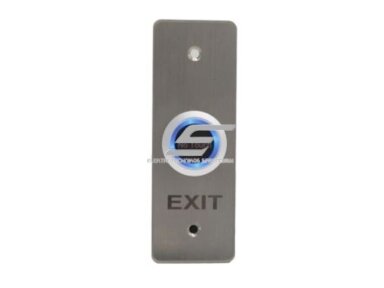
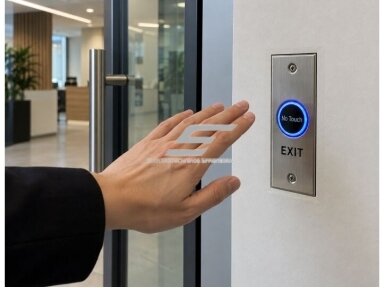 Exit door button | 12/24VDC | 115x40x25mm | NO/NC/COM | flush-mounted | contactless | EXIT | PBA-700BCode: PBA-700B EXIT
PBA-700B – a contactless sensor EXIT door button designed for access control, electric lock and door control systems. The exit command is activated without touching a mechanical button, making it a convenient solution for offices, administrative, commercial and other high-traffic premises. The button operates on 12/24 V DC, has NO, NC and COM contacts and is designed for flush mounting. Compact dimensions – 115 × 40 × 25 mm, operating temperature – −20 °C to +55 °C.
Price 13.99 € VAT incl.( 11.56 € VAT excl. )


Subscribtion to new arrivals
Information